



Tamil audio transcription தமிழ்

Tamil speech to text for audio and video

SpeechText.AI turns recorded Tamil speech into editable Tamil text. Go beyond basic dictation with recording-type settings, industry-specific model options, speaker labels and document or subtitle exports, all in your browser.

Get the words out of the recording and into a Tamil transcript you can check, edit and share.

  • 50+ languages, including Tamil
  • EU-hosted
  • Plans from US$9/month
From a Tamil recording to editable text An audio or video file passes through Tamil speech recognition, then becomes a transcript for review and export. அ தமிழ்
Speaker 1 · Example text00:08

இந்தத் திட்டத்தின் முக்கிய நோக்கம் என்ன?

Speaker 1 · Example text00:12

இன்று நீர்ச் சுழற்சியைப் பற்றிப் பார்ப்போம்.

Speaker 1 · Example text00:24

அடுத்த கூட்டம் வெள்ளிக்கிழமை காலை பத்து மணிக்கு நடைபெறும்.

Choose your Tamil recording

Drop a file here. Continue to your account to transcribe.

MP3, WAV, M4A, MP4, MOV and moreFile selection preview only. Transcription starts in your account.
Used for professional transcription

SpeechText.AI customers

Teams use the platform to turn interviews, meetings and recorded research into documents they can work with.

SpeechText.AI customer logo SpeechText.AI customer logo SpeechText.AI customer logo SpeechText.AI customer logo
01 / The transcription workflow

How to convert Tamil audio to text

Upload a recording, select Tamil and let AI do the first pass. Then listen, correct and export. No need to type out every sentence yourself.

  1. Upload audio or video

    Open your account and upload your Tamil recording. Use the original file for the clearest available sound.

    Working with video?

    SpeechText.AI extracts the audio track from supported video files. You do not need a separate audio converter.

  2. Select Tamil and context

    Choose Tamil as the spoken language, then set the recording type and a suitable subject model from the available options.

    Which settings matter?

    Match the type to your recording, such as a lecture, interview, meeting or conference call. Model options depend on the language selected.

  3. Generate the Tamil text

    AI recognizes the speech and adds punctuation. Enable speaker identification for recordings with several people.

    More than one speaker?

    Speaker labels separate conversational turns. Check those labels where voices overlap or a participant speaks quietly.

  4. Review, edit and export

    Check the Tamil transcript alongside the audio. Download a document for your team or a subtitle file for your video.

    Before you publish

    Verify names, dates, figures and English terms. For subtitles, check timing and line breaks in your video editor.

Tamil speech becomes Tamil-script text. English translation and Latin-letter transliteration are separate tasks.
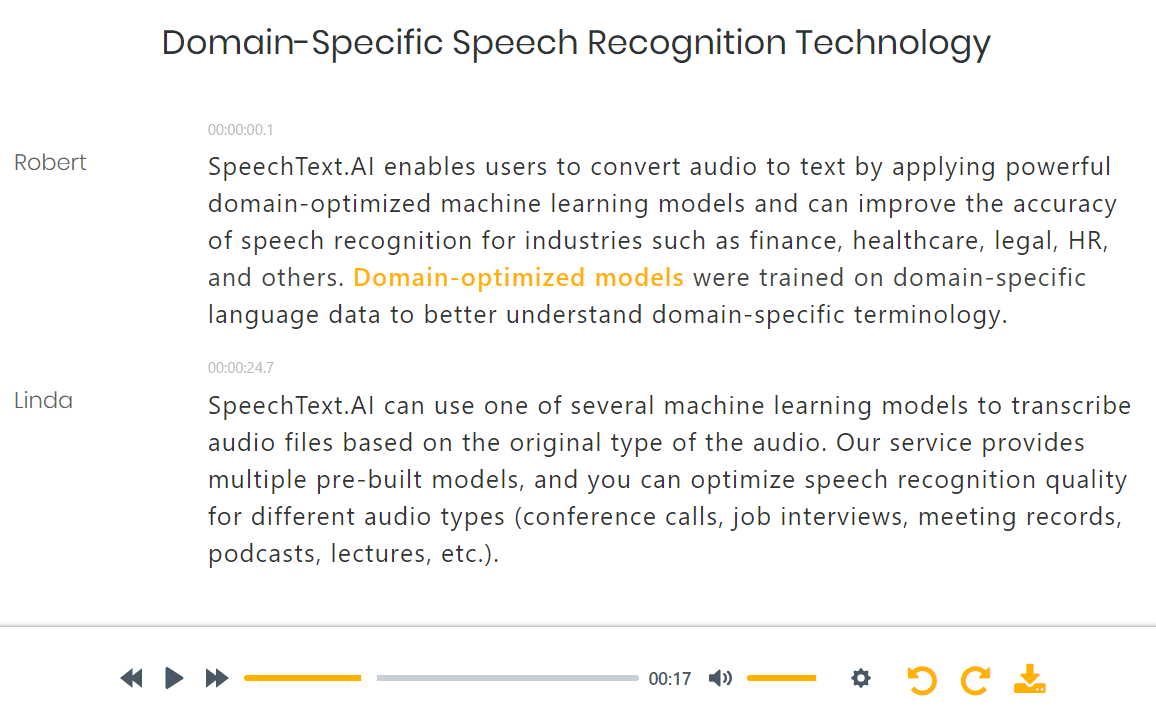
SpeechText.AI workspace for transcription settings and browser-based transcript editing
Context makes a difference

A lecture is not a conference call.

A lecturer speaking into one microphone and six people joining a remote meeting create very different audio. SpeechText.AI lets you set the recording type instead of treating every upload the same. Subject-model options add another layer of context for professional vocabulary.

  • Choose the recording type that matches the conversation.
  • Use an available domain model for subject-heavy material, rather than relying on a generic setting.
  • Listen back in the editor before turning a spoken exchange into a published quote or report.

See the workspace before you start

Watch the general SpeechText.AI product overview, from file upload to transcript review.

02 / Beyond basic Tamil dictation

Built for recordings, not just a quick voice note

A microphone keyboard helps with a short message. A recorded interview needs file handling, speaker labels, review and export. SpeechText.AI brings those steps into one workflow.

Tamil voice to Tamil script

Get editable Tamil characters from spoken Tamil. You do not need to type with an English keyboard and convert the letters afterwards.

Industry-specific model options

The engine offers models for finance, medicine, law and other fields. Choose a relevant model where it is available for your selected language.

Settings for your audio type

Match processing to a lecture, interview, meeting or call. Give the engine useful context before it starts recognizing the speech.

Speaker-labelled conversations

Keep track of conversational turns in Tamil interviews and meetings. Review speaker labels when people interrupt or talk over one another.

Tamil video to text online

Upload a supported video and transcribe its spoken audio. Automatic punctuation gives you a readable starting point, not an unbroken stream of words.

Review with the original audio

Listen and correct the transcript in your browser. Check the uncertain phrase while the source recording is still close at hand.

Documents and Tamil subtitles

Export DOCX or PDF for written work, or SRT and VTT for captions. Choose an output that fits the next step in your project.

50+ languages in one service

Keep Tamil projects alongside recordings in other supported languages. Select the spoken language for each transcription job.

Tamil transcription at a glance

Input
Recorded Tamil speech
Output
Editable Tamil-script text
Common uploads
MP3, WAV, M4A, MP4, MOV, WEBM
Exports
DOCX, PDF, SRT, VTT
Workflow
Upload, transcribe, review, download
Infrastructure
EU-hosted, automated processing
03 / A practical accuracy check

Judge the transcript against your Tamil recording.

Clear speech helps. So do the right settings. But a studio interview, a busy classroom and a phone call will not produce identical results. Use a representative recording for your first test, with the same speakers, microphone and subject matter as your real project.

  1. Check the Tamil sounds that change meaning.

    Vowel length matters: கல் and கால் are different words. Review ல, ள and ழ in names and unfamiliar terms instead of judging accuracy by how tidy the page looks.

  2. Pay attention when the language switches.

    English abbreviations, product names and technical terms often appear inside Tamil sentences. Listen back to those passages and correct the spelling you want in the finished document.

  3. Verify the details people act on.

    Check dates, amounts, names and quoted statements. For legal, clinical or other high-stakes work, have a qualified reviewer check the final text.

04 / Tamil writing, explained

Tamil speech in. Tamil writing out.

Transcription, translation and transliteration solve different problems. Choose the right one before you upload.

You can speak Tamil without typing every word.

Looking for "Tamil speak to Tamil typing"? Record your voice on your phone or computer, then upload the file and select Tamil. SpeechText.AI turns that recording into text. This is a file-based transcription workflow, not a live Tamil keyboard.

உங்கள் ஆடியோ அல்லது வீடியோ கோப்பைப் பதிவேற்றி, மொழியாகத் தமிழைத் தேர்ந்தெடுக்கவும். கிடைக்கும் உரையைச் சரிபார்த்து, தேவையான திருத்தங்களைச் செய்து பதிவிறக்கவும்.

Spoken Tamil and formal written Tamil are not the same thing. Keep a speaker's wording when you need a faithful quote; make a separate editorial pass when you need a formal report. Already have Tanglish typed in Latin letters? Converting that text into Tamil characters is transliteration, not audio transcription.

One sentence. Three different tasks.

Transcription: Tamil speech written in Tamil
நாளை சந்திப்போம்.
Translation: the meaning in English
We'll meet tomorrow.
Transliteration: Tamil written in Latin letters
Naalai sandhippom.

These examples explain the difference. The upload workflow on this page is for transcription.

06 / Privacy and control

Know where your recordings go.

SpeechText.AI processes personal data in line with GDPR requirements. EU-hosted infrastructure, secure transfer and account controls support the transcription workflow.

Secure transfer

Recordings are transferred over a secure connection. Check the privacy policy for the service's data-handling terms.

EU-hosted servers

SpeechText.AI's physical server infrastructure is located within the European Union.

Automated transcription

The standard workflow uses speech recognition software. It does not require a human transcriber to type out your recording.

Account-level deletion

Delete uploaded recordings and transcripts through your dashboard. Consult the privacy policy for data-retention details.

Before uploading interviews or client material, check consent and your organization's requirements. Read our Privacy Policy and Terms of Service, or ask a specific data-handling question at support@speechtext.ai.

07 / Test first, then choose your minutes

Tamil transcription from US$9/month

Start with your own audio, not a polished demo. Use the free trial to check the transcript, the editor and the exports before choosing a paid plan.

More time for bigger projects

For interview collections, regular team meetings and longer video or research projects.

Plans with up to2,700transcription minutes

  • Higher-volume transcription plans
  • Audio and video in the same workflow
  • Document and subtitle file exports

Prices are in USD. Check the trial allowance, upload limits and current billing terms at signup before starting a large batch.

08 / Before your first upload

Tamil speech to text: your questions answered

The details that matter, from Tamil letters and regional speech to video files, subtitles and privacy.

How do I convert Tamil speech to text?

Upload your audio or video file to SpeechText.AI, choose Tamil as the spoken language, and select a suitable recording type. Start transcription, review the Tamil text against the audio, then export a document or subtitle file.

Will I get Tamil text or an English translation?

The Tamil transcription workflow converts spoken Tamil into editable Tamil-script text. It does not translate the recording into English or convert text typed in Latin letters into Tamil. Translation and transliteration are separate tasks.

Can I convert a Tamil video to text online?

Yes. Upload a supported video file such as MP4, MOV or WEBM. SpeechText.AI extracts the audio track and transcribes the spoken Tamil, so you do not need to extract the audio yourself. It transcribes speech, not text shown on screen.

Does "Tamil speak to Tamil typing" mean live dictation?

This page is for transcribing recorded speech, not a live microphone keyboard. Record yourself with your phone or computer, upload the file to your account and choose Tamil. You do not need a Tamil keyboard to generate the first transcript.

How accurate is Tamil audio transcription?

SpeechText.AI's general engine accuracy claim is up to 99%; it is not a Tamil-specific benchmark. Noise, overlapping voices, dialect, microphone quality and Tamil-English language switching affect the result. Test a representative recording and check names, numbers and specialist terms before using the transcript.

Can it handle regional Tamil and Tamil-English speech?

Choose Tamil for a mainly Tamil recording. Regional pronunciation and English words mixed into Tamil need a careful review, especially names, acronyms and technical terms. Test a sample that matches your speakers, whether they use Tamil Nadu, Sri Lankan or another variety of Tamil, before processing a large archive.

Can I download Tamil subtitles and Word documents?

Yes. Review the transcript, then export DOCX or PDF for documents, or SRT or VTT for subtitles. Check caption timing and line breaks before publishing, and use a font with Tamil support in your document or video editor.

Which audio and video files can I upload?

Common supported formats include MP3, WAV, M4A, FLAC and OGG for audio, and MP4, MOV, AVI and WEBM for video. Check your plan's upload limits in your account. If a file fails, export a fresh MP3 or WAV copy; changing the filename extension does not convert the file.

Is there a free Tamil transcription trial?

SpeechText.AI offers a free trial. Paid plans start at US$9 per month with 240 transcription minutes, with higher-volume plans offering up to 2,700 minutes. Check the trial allowance, file limits and billing terms at signup.

How does SpeechText.AI protect recordings?

SpeechText.AI uses EU-hosted infrastructure and secure data transfer, and processes personal data in line with GDPR requirements. Standard transcription is automated. You can delete uploaded recordings and transcripts from your account. Read the privacy policy for data-handling terms and upload only recordings you have permission to process.

Is there an API for Tamil transcription projects?

SpeechText.AI provides a speech recognition API for adding transcription to apps and automated workflows. Check the API documentation for supported language settings, request options and limits before building your Tamil transcription integration.

Your next Tamil transcript starts with one recording.

Choose a clear, representative clip. Upload it, select Tamil and check the words against the audio. Then put the finished text to work.

Try Tamil transcription free Paid plans from US$9/month for 240 minutes.